Freitag, 26. April 2013

Raycasted Spheres and Point Sprites vs. Geometry Instancing (OpenGL 3.3)

Source code of sphere_shader examples (raycasted spheres and mesh-based spheres) written in OpenGL 3.3. Code also includes handy camera, shader classes and (GPU) timer functions based on glQueryCounter. Tested on Linux and Windows.

Dependencies: OpenGL, GLEW, and FREEGLUT and glm.

Download source code:
https://github.com/tdd11235813/spheres_shader
(Update: 2016/03/12 - refactoring of code framework)
http://tubafun.bplaced.net/public/sphere_shader.zip
(Update: 2013/05/21 - added: common shaders with VBO and duplicated parameters)

Developing the QPTool I was interested in the performance of the different types of sphere visualizations.
  1. Spheres with Geometry Instancing (mesh-based)
  2. Sphere Impostors with hardware based Point Sprites (GL_POINT_SPRITE_ARB)
  3. Sphere Impostors with Geometry Shaders
  4. Sphere Impostors with common Shaders (Parameters via TBO)
  5. Sphere Impostors with common Shaders (Parameters duplicated in VBO)

Mesh-based Spheres


The first implementation uses mesh-based spheres by the help of geometry instancing [2]. In the initialization a sphere mesh is sent down to the GPU. By glDrawElementsInstanced(...) the object geometry gets cloned many times. A shader places these objects into the scene. Usually this is a good improvement for visualizing a massive amount of same (complex) geometry. In our case there are two disadvantages:

  1. Meshes are a visible inaccurate approximation of the spheres.
  2. Polygon data increases with the resolution of the spheres, slows down the application regardless of the screen resolution.

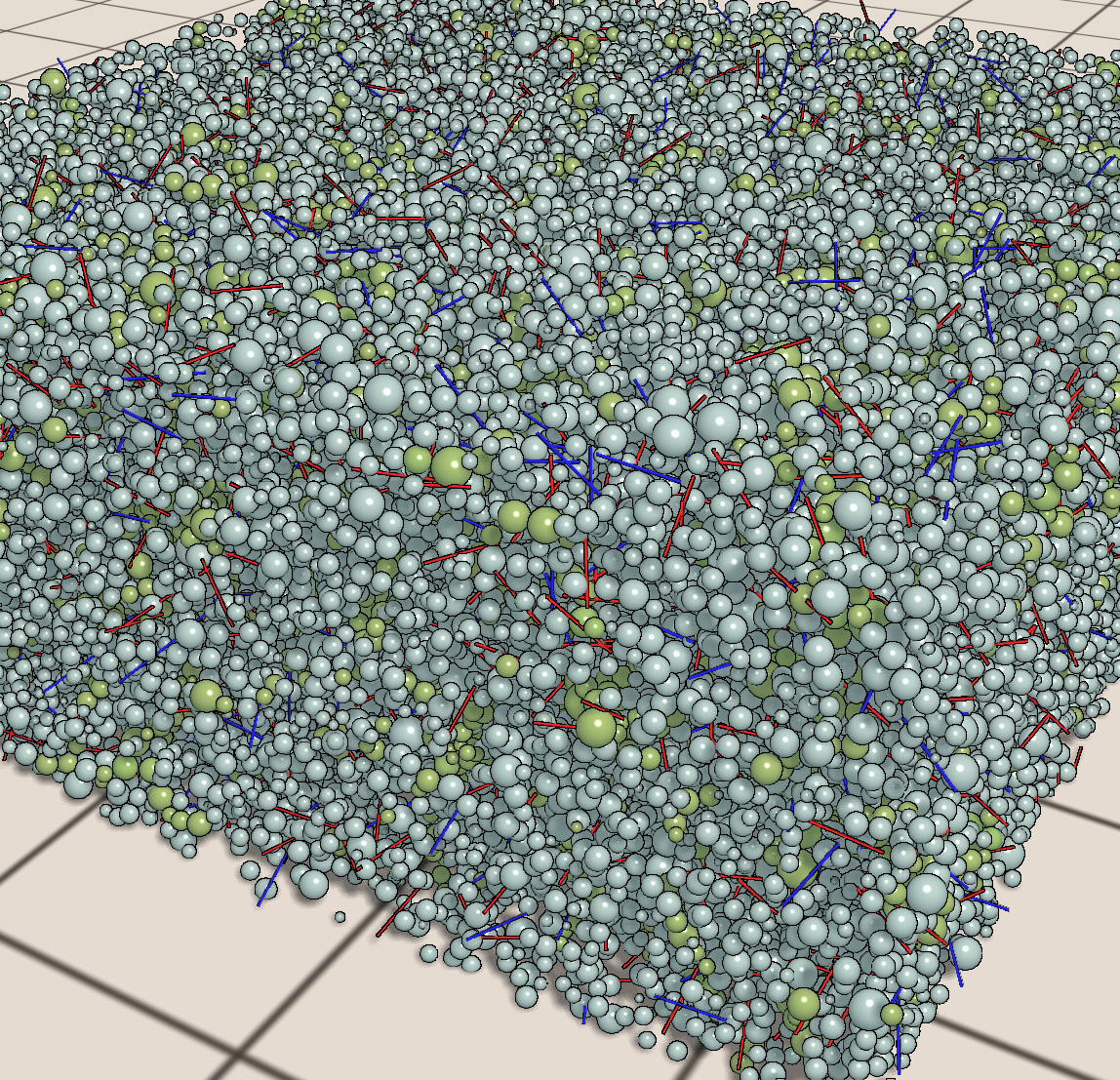
In this picture you see in the bottom part the artifacts by the polygon approximation of the spheres. The upper two parts show raycasted sphere impostors (screenshot from QPTool v0.9.7).

Sphere Impostors by Raycast-Shaders


These two pictures are from the sphere_shader examples. First picture shows the mesh-based spheres and the second one the impostors.


If we want to use shaders to render the spheres in the fragment shader on our own, we need a billboard.
A billboard is a flat object, usually a quad (square), which faces the camera. [3]
This quad must be generated with texture coordinates before we can use it. A good explanation can be found here [4]. There are several ways to achieve this. It is possible to use hardware based point sprites, where for each vertex a billboard is created. In the vertex shader you just have to set the point size, which makes up the billboard size later. There are some issues with compatibility and correct visuals. If you take the particles demo from CUDA SDK, where this rendering method is utilized, you might notice wrong quad sizes, especially when the quads move to the borders of the screen. I tried to fix that, but there are still some glitches.

Another possibility uses geometry shader. Dummy vertices (one per sphere) are sent down to GPU and the geometry shader creates four vertices making the billboard for one sphere.

The last way would be sending four vertices per sphere with predefined texture coordinates down to the GPU. By this either a second data buffer is needed for the parameters OR all the parameters are duplicated (4x) in the vertex buffer object.

One disadvantage of the implemented sphere impostor shaders is, Early depth test is not possible, since z-buffer is computed in fragment shader.

Results


Setting: 800x600
Hardware: GPU Nvidia GTX 470 (Fermi), CPU Intel Quad Core i7 @3.07GHz, 12GB RAM
OS: Windows 7 64bit
Number of spheres: 100,000
Parameters per sphere: Position (4 floats), Color (4 floats), Radius (1 float)
Frames measured after warmup: 200

Benchmark Results of Rendering Methods for Spheres (in ms)
FOV = 60
MethodAvg1Avg2Min1Min2Max1Max2
Sphere Geometry Instanced121.5230.013121.1730.006122.1340.023
Sphere Billboard Quads (TBO)7.0800.0226.9380.0177.2010.029
Sphere Billboard Quads (VBO) 1.8790.0021.8740.0011.8860.003
Sphere Impostor Geometry Shader1.9150.0011.9000.0011.9330.002
Sphere Point Sprites, with Glitches :(1.5410.0011.5010.0011.6190.002
FOV = 20
Sphere Geometry Instanced121.6060.015121.0810.003122.0830.027
Sphere Billboard Quads (TBO)8.3200.0238.2910.0198.3590.031
Sphere Billboard Quads (VBO) 8.2300.0018.2270.0018.2340.001
Sphere Impostor Geometry Shader8.2290.0018.2240.0018.2430.001
Sphere Point Sprites, with Glitches :( 7.7560.0017.7520.0017.7630.001
FOV: Field of view. The lower the value, the more sphere-pixels have to be drawn. It is like zoom.
***1: Value for whole frame in ms.
***2: Value for binding and shader config in ms.

Sphere Impostor Geometry Shader: Takes 1 dummy vertex, creates 4 vertices for billboard on the fly.

Sphere Billboard Quads: Takes 4 vertices with preset texture coordinates for billboard. Uses either texture buffer object (TBO) for sphere parameters or parameters which are duplicated (4x) as vertex attributes in the vertex buffer object (VBO).

Sphere Geometry Instanced: Polygon representation of sphere. Using geometry instancing.

Sphere Point Sprites. Hardwarebased Billboard generation (point sprites). Alas, there are glitches and incompatibilities, so I do not recommend to use this.

My current implementation uses the geometry shader method, because it has no glitches so far and it is fast. Nevertheless I would recommend to use predefined billboards with duplicated data, since you will not find geometry shader support "everywhere".

On Linux with a Kepler GPU I obtained following interesting results:

Setting: 800x600
Hardware: GPU Nvidia GTX 670 (Kepler), CPU Intel Quad Core i7 @3.4GHz, 8GB RAM
OS: Linux Kubuntu 12.04
Number of spheres: 100,000
Parameters per sphere: Position (4 floats), Color (4 floats), Radius (1 float)
Frames measured after warmup: 200

Benchmark Results of Rendering Methods for Spheres (in ms)
FOV = 60
MethodAvg1Avg2Min1Min2Max1Max2
Sphere Geometry Instanced50.9430.00350.3700.00153.1170.013
Sphere Billboard Quads (TBO)1.0870.0031.0690.0011.1590.010
Sphere Billboard Quads (VBO)1.0610.0011.0590.0011.0640.002
Sphere Impostor Geometry Shader1.0660.0011.0630.0011.0690.003
Sphere Point Sprites, with Glitches :(0.8970.0010.8950.0010.9020.003
FOV = 20
Sphere Geometry Instanced50.7980.00450.3560.00153.4870.015
Sphere Billboard Quads (TBO)6.1910.0016.1370.0016.7470.008
Sphere Billboard Quads (VBO)6.1330.0016.1300.0016.1370.003
Sphere Impostor Geometry Shader6.1210.0016.1160.0016.1270.002
Sphere Point Sprites, with Glitches :( 5.4420.0015.4400.0015.4460.002
FOV: Field of view. The lower the value, the more sphere-pixels have to be drawn. It is like zoom.
***1: Value for whole frame in ms.
***2: Value for binding and shader config in ms.


Please leave a comment, if you encounter bugs or know more or if you have other ideas.


[1] - http://www.arcsynthesis.org/gltut/Illumination/Tutorial%2013.html
https://web.archive.org/web/20150215085719/http://www.arcsynthesis.org/gltut/illumination/tutorial%2013.html
[2] - http://wiki.delphigl.com/index.php/shader_Instancing
[3] - http://nehe.gamedev.net/article/billboarding_how_to/18011/
[4] - http://www.sunsetlakesoftware.com/2011/05/08/enhancing-molecules-using-opengl-es-20

Mittwoch, 17. April 2013

QPTool - A swelling process simulator running on GPU (CUDA, OpenGL)

This post is about my recent work. A swelling process simulator (german: Quellprozess) with glass fibers. The project is running at the IKGB Department of the University of Freiberg (East Germany). I have been working mostly on my own, doing this besides of my master study for one year and it makes a lot of fun. The simulator is open source, licensed under GPL v3, so you can grab the source from git (qptool). At the moment third party libraries are not provided, but they can be obtained from the web. I will post a running application here, when v1.0.0 is released.

The swelling process is driven by 'expanding' hydrogen gas bubbles within the fluid concrete. It is a part of the production process of the AAC, a really versatile, lightweight, cheap precast building material. That hydrogen gas is triggered by a really small amount of aluminium powder in the raw mix. The gas can escape later and in the end the pores contains just air.

To improve the properties of the AAC, (alkali-resistant) glass fibers will be added to the raw mix. The swelling process will distribute the fibers. The simulation helps to understand the movements and directions of the fibers from beginning to the end of the whole swelling process.

QPTool is written in C++, Qt 4.7.4, CUDA 5.0, OpenGL 3. The simulation and visualization is completely done on the (Nvidia) GPU. This gives a good framerate even for medium sized simulations (131k Spheres, 8k Fibers at ~16 FPS). The pores are just expanding spheres, following the Cherrypit Model. The fibers are just lines in the simulation colliding only with spheres (no fiber-fiber interaction), since the glass fibers are very thin.

Renderer:
  • Simple Raycast-Shader (e.g. Spheres are computed in Shader)
  • Multipass Raycast-Shader with Shadows and Edge Filter
  • Geometry Renderer (using instancing technique, but it is slower and uglier than simple raycast-shader)
Simulation
  • CUDA driven physics engine
  • Using uniform space subdivision (based on SDK example 'particles' from Nvidia)
  • Slice-cutting computation (simulates cutting of the concrete block)
  • User can create fiber clusters with preferred directions
  • Real-data based and generic distribution of end radii of pores
Analysis
  • Distribution of pores and fibers
  • Radii of pores
  • Fiber directions (phi/theta diagram)
  • ...
Tools
  • Recording long-term simulations into video alongside with statistics
  • Benchmark tool to compare algorithms
  • Export simulation data to csv for further processing
  • Import simulation data
  • Session and simulation setting management
  • ...

Just some pictures:

Comparison Shader vs. Geometry
Fiber Clusters
Simulation
QPTool v0.9.7
Radius Distribution
Slice cutting the block


Credits:
- S. Matthes: My boss :) He does the higher mathematics and experimental investigations for this simulation. Thanks for all the great discussions and for giving me this opportunity.
- Prof. B. Steinbach, allowing me to use an office room for free (including Desktop PC with Nvidia GPU of course :) )
- Nvidia, CUDA, Simon Green, SDK Demo 'particles'.
- Qt (used Qt 4.7.4), Qwt, Qxt / libqxt
- CAviFile Class, Xvid Encoder used for recording tool (video rendering)
- ...

Further sources which I used or adapted or helped me to understand the things better
- FastDelegate
- PixelBufferObjects Class
- Camera Control Class
- several tutorials over the web about OpenGL buffer objects, renderbuffer, framebuffer, shader instancing, shadows shader, ... (take the appropriate buzzword and google it)
- Christian Sigg (GPU-Based Ray-Casting of Quadratic Surfaces)
- Article on Molecules: Enhancing Molecules using OpenGL ES 2.0
- ... and many more ... :)


v0.9.7 still has some bugs and cylinder impostor shader is not finished yet.

Donnerstag, 5. Juli 2012

Dienstag, 29. Mai 2012

Kleine Linksammlung ([GP]GPU, Hardware)

CUDA

CUDA Webinars (Online Präsentationen zu CUDA und GPGPU Techniken):
http://developer.nvidia.com/cuda/cuda-education-training

Zur GT300/GF100 bzw. Fermi Architektur
http://www.nvidia.com/object/GTX_400_architecture.html
http://www.computerbase.de/artikel/grafikkarten/2010/bericht-nvidia-gf100-technische-details/4/#abschnitt_streaming_multiprocessor_sm

Artikel zur GTX 470/480 und Fermi-Architektur
("Vergleich" mit ATi HD5870)
http://www.tweakpc.de/hardware/tests/grafikkarten/nvidia_geforce_gtx_480/s02.php

CUDA und OpenCL Vergleich und Missverständnisse
http://www.streamcomputing.eu/blog/2011-06-22/opencl-vs-cuda-misconceptions/

CUDA Supported GPUs:
http://en.wikipedia.org/wiki/CUDA#Supported_GPUs

GPGPU/CUDA Einführung, Workflow (ausführliche Informationen mit Tipps&Tricks)
http://www.moderngpu.com/intro/performance.html
http://www.moderngpu.com/intro/workflow.html

 
Nomenklatur Nvidia GeForce

Die Namensgebung von Nvidia ist äußerst "interessant". Anbei ein paar Auflistungen zur möglichen Entwirrung.
Hinweise: Die Bezeichnung der Chiparchitektur müssen nicht immer mit den Modellbezeichnungen 1-zu-1 übereinstimmen. Auch bedeutet eine höhere Modellnummer nicht automatisch bessere Technik. Neuauflagen (Rebranding) älterer Grafikchips sind zu berücksichtigen. So verwenden die GTS 240/250 noch den G92b Chip, während sonst die Geforce 200 Serie auf GT2xx Chip basiert. Modelle wie GT 320 verwenden noch den GT2xx Chip. Die GT 330 verwendet sogar noch den G92b Grafikchip.

Geforce 9 Modelle wurden später einfach umbenannt und finden sich als GT 1xx wieder. Die Umbenennung schließt die Lücke zwischen der 9er Serie und der nachfolgenden GT200 Architektur, wenn ich das richtig verstanden habe. Eine Geforce 9500 GT heißt dann Geforce GT 120. GT200 ist dann als Nachfolger die eigentliche Tesla Architektur und entsprechende Modelle heißen bspw. GT 240 oder GTX 285. Der Grafikchip GT300 führt die Fermi Architektur ein und begründet wieder eine neue Kodierung: GF100. Analog bei der Kepler Architektur mit GK100. Mit der GT100er/200er Serie kommt generell ein neues Bezeichnungsschema für die GPU-Modelle zum Einsatz:
  • G oder kein Suffix – Low-Budget
  • GT – Mainstream
  • GTS – Performance
  • GTX – High-End
CUDA Generation Codename Grafikchip Beispielmodelle
1 (Unified Shader Architecture) G80, G92[b], G94, G96[b], G98 Geforce 8800GT, Geforce 9800GT, ..., 
siehe auch Geforce 100 Serie
2 Tesla GT200[b], GT215, GT216, GT218 GT 240, GTX 285, ...; 
GT320, GT 340, ...;  
Tesla C1060
(Geforce 405)
3 Fermi GF100, GF104, GF106, GF108;
GF110, GF114,...
GT 440, GTX 470;
GT 520, GTX 570, GTX 580;
GT 605, GT 620, GT 645
4 Kepler GK104, GK107, GK108, GK114,... GT 630, GTX 670, GTX 680, GTX 690
5 (>=2013) Maxwell


- http://en.wikipedia.org/wiki/GeForce#Nomenclature
- http://forums.nvidia.com/index.php?showtopic=226700&st=40
- http://www.pcgameshardware.de/aid,775478/Nvidia-Nach-Fermi-folgen-Kepler-und-Maxwell/Grafikkarte/News/


OpenGL / DirectX

Warum DirectX inzwischen so verbreitet ist, obwohl OpenGL mindestens wenn nicht sogar bessere Chancen hatte:
API use was shifted in favor of DirectX by Microsoft's two-pronged DirectX campaign around the launch of XBox 360 and Windows Vista, including the spread of FUD (fear, uncertainty and doubt) about the future of OpenGL, and wild exaggeration of the merits of DirectX. Ever since then, the network effects have amplified this discrepency until OpenGL has almost disappeared entirely from mainstream PC gaming.
http://blog.wolfire.com/2010/01/Why-you-should-use-OpenGL-and-not-DirectX
+ http://www.joystiq.com/2009/05/22/dubious-marketing-microsoft-makes-directx-9-look-really-bad/

Artikel contra OpenGL
http://www.tomshardware.com/reviews/opengl-directx,2019-10.html

Gegenüberstellung einiger Features für OpenGL und DirectX
http://rastergrid.com/blog/2011/10/opengl-vs-directx-the-war-is-far-from-over/

Sonstiges

Maxwell GPUs mit ARM Rechenkerne (2011 kaufte Nvidia ARM Lizenzen, siehe auch Nvidia Tegra):
http://www.heise.de/newsticker/meldung/Nvidia-bestaetigt-Auf-Maxwell-GPUs-sitzen-auch-ARM-Prozessorkerne-1172923.html

http://www.streamcomputing.eu/blog/2012-04-18/usb-stick-sized-arm-computers/
http://www.itproportal.com/2011/06/20/intel-pushes-hpc-space-knights-corner/
http://www.pcwelt.de/ratgeber/Die-wichtigsten-ARM-Prozessoren-4159343.html

[...]

Mittwoch, 11. April 2012

Linux/Kubuntu - Qt + Cuda + QtCreator

"Cuda Toolkit 4.1 and Qt4 on Linux"

It is time for another tutorial. Today we want to setup Qt+Cuda on Linux/Kubuntu. It is recommend to install Qt from the repositories. In the 3rd section I also wrote down the instructions for compiling Qt from scratch. If you find some oddities, just leave a comment (this isn't the best HowTo, I am still learning).


Content:
1. GPU Drivers + CUDA Toolkit 4.1 + CUDA SDK
2. QtCreator and Qt4 Example Project with CUDA
3. Compile Qt4 from scratch (optional)
4. Tools - Debugging and Profiling

--

My System:
- Kubuntu 11.10 (Oneiric Ocelot) at 32bit.
- g++ v4.5, gcc v4.5 (4.6 and up is not supported by cuda toolkit 4.1, see here)
- Qt 4.7.4 (dev-tools, qtcreator)

Downloads:
- Cuda Toolkit 4.1 + SDK (got Ubuntu 11.04 & 32bit)
- qt4_mandelbrot (Qt4 example project with Cuda kernel)


--

1. Get the NVidia / CUDA stuff installed:

I've got here:
cudatoolkit_4.1.28_linux_32_ubuntu11.04.run
gpucomputingsdk_4.1.28_linux.run

1.1 Drivers
First of all we update our nvidia drivers. After I got some troubles with the downloaded drivers (blue colored videos^^) the following did it for me.

sudo add-apt-repository ppa:ubuntu-x-swat/x-updates
sudo apt-get update
sudo apt-get install nvidia-current

I've uninstalled all the nvidia drivers before, but maybe you don't have to. I did a backup of my /etc/X11/xorg.conf and stopped the x-server (ctrl+alt+F1 and sudo stop kdm, then purging my old nvidia stuff, then run the commands from above and finally sudo start kdm to get back, I hope you wont need to do that).

Now I have NVidia driver version 295.40.

(Refs: wiki.ubuntuusers.de, hecticgeek)

1.2 Toolkit
Just run:
sudo ./cudatoolkit_4.1.28_linux_32_ubuntu11.04.run

Edit your .bashrc:
export PATH=/usr/local/cuda/bin:$PATH
export LD_LIBRARY_PATH=/usr/local/cuda/lib:$LD_LIBRARY_PATH


1.3 NVIDIA GPU COMPUTING SDK
To install the gpu computing sdk, just run as user:
./gpucomputingsdk_4.1.28_linux.run

The examples are not build yet, you actually have to run make in ~/NVIDIA_GPU_Computing_SDK, but in most cases errors will occur.

Error Messages:

"unsupported GNU version! gcc 4.6 and up are not supported!",
Install gcc-4.5 and g++-4.5 as a second compiler and softlink to it in /usr/local/cuda/bin
sudo ln -s /usr/bin/gcc-4.5 /usr/local/cuda/bin/gcc

rendercheck_gl.cpp:(.text+0x119b): undefined reference to 'gluErrorString'
cannot find -lcuda
Lib paths are messed up in common.mk and common_cudalib.mk (see here). Path to nvidia_current is missing. I have uploaded a patched version.

Download Patch

Maybe you have to edit the path to your nvidia driver where libcuda and others are located. Edit in that downloaded patch the files common.mk and common_cudalib.mk at the beginning:
# ### patch for finding libcuda
NVIDIA_CURRENT = /usr/lib/nvidia-current/

There are still some errors in the freeImageInteropNPP in CUDALibraries, but I dont care for the moment. The examples can be compiled in NVIDIA_GPU_Computing_SDK/C/ directly. I run deviceQuery to check if installation was successfull.
~/NVIDIA_GPU_Computing_SDK/C/bin/linux/release$ ./deviceQuery

If this is working for you, then everything with cuda is fine. If you got "./deviceQuery: error while loading shared libraries: libcudart.so.4: cannot open shared object file: No such file or directory", then you forgot to add the cuda libs to LD_LIBRARY_PATH.


--

2. Qt4 Projects with CUDA on Linux

Start your QtCreator and create a new project (or download qt4_mandelbrot as example). My structure is:
qt4_mandelbrot - source code
qt4_mandelbrot/obj - object code including cuda object code
qt4_mandelbrot/bin - binaries

// I've disabled the shadow build option in the qt4 project settings, because I configured the directories in the .pro file on my own.

For the .pro file cuda settings I refer to this site. You also can have a look at the qt4_mandelbrot project.

In QtCreator you need to set the build environment. Go to Projects and add to the Build Environment a new variable "LD_LIBRARY_PATH" with "/usr/local/cuda/lib". Check if the execution environment has this setting as well.


Press Ctrl+B or Ctrl+R to build/run the project.

--

3. Qt4 - compile it from scratch (optional)


Downloads:
- Qt Environment (Download Page)
- - Qt Sourcecode (tar.gz) (v4.8.1)
- - Qt Creator (32bit Binary, v2.4.1)

untar source code:
tar -xf qt-everywhere-opensource-src-4.8.1.tar.gz

configure Qt for compilation ("-release", "-shared" are actually default)
./configure -release -shared -no-qt3support -no-webkit -optimized-qmake -no-multimedia -no-phonon -nomake examples -nomake demos

compile and install (takes a while, runs with two jobs at once cuz I have two CPUs):
sudo make install -j2

install qt creator
chmod +x qt-creator-linux-x86-opensource-2.4.1.bin
./qt-creator-linux-x86-opensource-2.4.1.bin


start qt creator and set path to qmake (Qt Creator - Tools - Options: Qt Versions):


Now you can try a qt application created by the project wizard of Qt Creator. Press Ctrl+R to compile and run.

To get access to Qt on shell/console, you have to extend the PATH variable. Edit .profile and .bashrc (home directory) and add:
export PATH=/usr/local/Trolltech/Qt-4.8.1/bin/:$PATH

Uninstall:
Qt: cd /pathto/qt_source and sudo make uninstall
QtCreator: cd /pathto/qtcreator/ and run ./uninstall

--

4. Tools - Debugging and Profiling
For debugging you can try DDD (sudo apt-get install ddd):
ddd --debugger cuda-gdb ./application

If you just have a single GPU you can't debug local kernels yet. Since NSight 2.2 enables Single-GPU debugging again (NSight is only for Windows/VisualStudio), I hope the upcoming Toolkit 4.2 will do this for Linux as well.

For informations on memory leaks and access errors just use cuda-memcheck (see manual ;) ).

Profiling:
To profile the gpu site you can use the nvidia profiler (nvvp). Just run nvvp and open your binary into a new session.

You can profile (the host site) with gprof or oprofile. gprof needs the compiler flag -pg that is also available in nvcc. Just have a look at the .pro file coming with this tutorials example project. To get a profile you have to run the binary, which creates a gmon.out for the gprof profiler. Now you can generate a readable output:
gprof ./qt4_mandelbrot > output.txt

oprofile (sudo apt-get install oprofile oprofile-gui).
"OProfile is a system-wide profiler for Linux systems, capable of profiling all running code at low overhead. [...] OProfile leverages the hardware performance counters of the CPU [...]" (oprofile website)

So oprofile offers CPU and hardware based profiling which gprof doesn't. For usage I just refer to this site. If you want to read more about the sampling methods and the advantages of oprofile, so read this site.


References:
http://stackoverflow.com/...cuda-incompatible-with-my-gcc-version
http://developer.nvidia.com/cuda-toolkit-41
http://wiki.ubuntuusers.de/Grafikkarten/Nvidia
http://www.hecticgeek.com/...drivers-in-ubuntu-11-10-oneiric-ocelot/
http://forums.developer.nvidia.com/...compiling-sdk-on-ubuntu-11-10/p1
http://qt.nokia.com/downloads
http://cudaspace.wordpress.com/...qt-creator-cuda-linux
http://www.gnu.org/s/ddd/
http://oprofile.sourceforge.net/about/
http://doc.opensuse.org/...tuning.oprofile.html
http://lbrandy.com/...oprofile-profiling-in-linux-for-fun-and-profit/